Artifacts and Caching
Pass files between jobs with artifacts, and speed up repeated runs with actions/cache.
Artifacts
An artifact is a file (or folder) a workflow hands to GitHub for safekeeping before the runner dies. GitHub stores it next to the run; downloadable from the run page or the API.
Uploading
- name: Upload the report
  uses: actions/upload-artifact@v4
  with:
    name: build-report
path: report.txtname— label the artifact appears under on the run page.path— one file, a folder, or a glob (dist/*.txt).
Retention
Default retention is 90 days, then GitHub deletes it. Shorten per artifact:
with:
  name: build-report
  path: report.txt
  retention-days: 5
Good habit for throwaway files (test reports) — storage on private repos counts against quota, and even public repos accumulate noise.
Why artifacts exist (and downloading)
needs: orders jobs, but each job’s runner is a fresh, empty machine — a build job’s output doesn’t exist on the test job’s disk. Artifacts bridge that gap: one job uploads, GitHub stores it, another downloads it.

jobs:
  build:
    runs-on: ubuntu-latest
    steps:
      - name: Build the package
        run: echo "the package" > app.txt
      - name: Upload the package
        uses: actions/upload-artifact@v4
        with:
          name: app-package
          path: app.txt
  verify:
    needs: build
    runs-on: ubuntu-latest
    steps:
      - name: Download the package
        uses: actions/download-artifact@v4
        with:
          name: app-package
      - name: Check it arrived
        run: test -f app.txt
Three details:
needs: buildis required — without it the jobs run simultaneously and the download would look for an artifact that doesn’t exist yet.namein download-artifact must exactly match the name used in upload-artifact.- Files land in the job’s working directory by default; a
pathinput can place them elsewhere.
Caching (actions/cache)
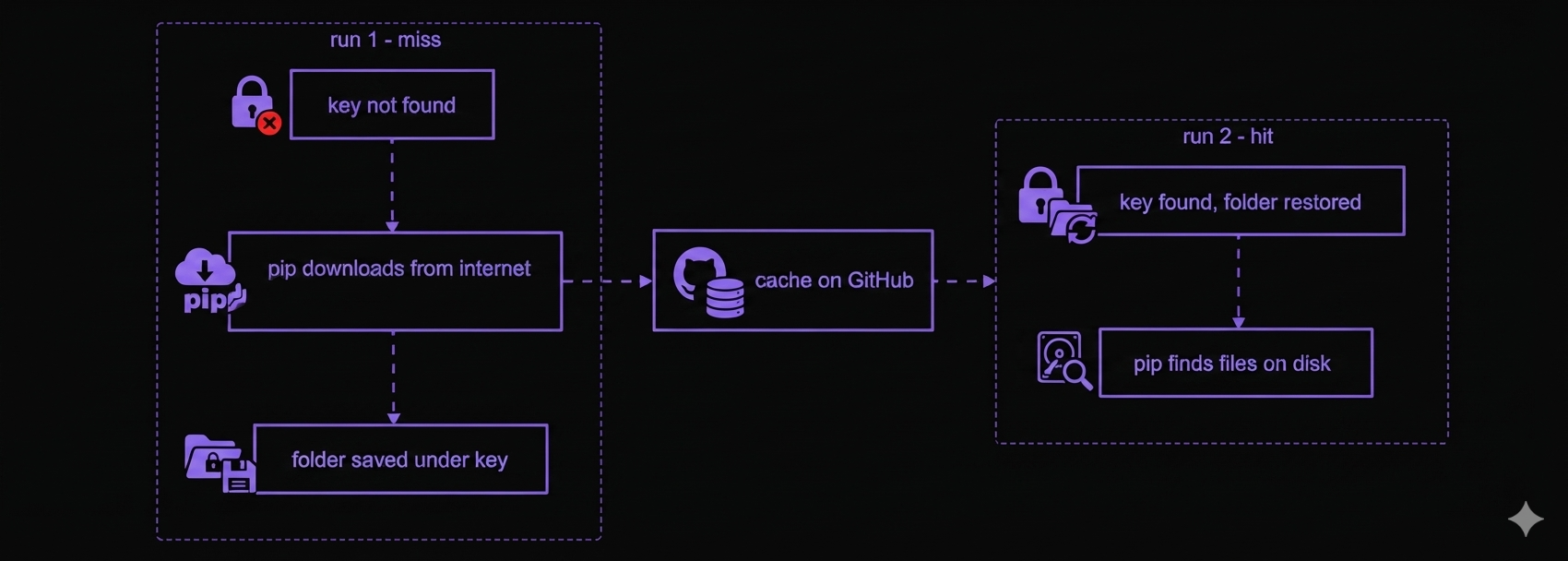
A cache saves a folder at the end of one run and restores it at the start of the next — same repository, different runs. Unlike an artifact, it’s meant for speeding up repeated runs, not passing data between jobs in the same run.
- name: Cache pip downloads
  uses: actions/cache@v4
  with:
    path: ~/.cache/pip
key: pip-v1path— the folder to save/restore (e.g.~/.cache/pip, where pip keeps downloads).key— the label the saved folder is stored under; the same key returns the same folder.
The step works both directions: it restores the folder if the key exists (cache hit); if not (cache miss), the job continues with nothing, and on a successful run the folder is saved under that key.