Foundations and Architecture
See why Kubernetes exists, how a cluster is organized, and what happens when you create a Pod.
Why Kubernetes
With Docker alone you run each container yourself and watch it yourself: one machine, one pair of hands. Kubernetes combines multiple machines into a cluster and runs and manages your containers across them.
The mindset change is that you describe the desired state (“keep five copies of this app running at all times”) and Kubernetes continuously works to make reality match it. It also spreads containers across the machines in the cluster so no single server runs everything.
The four problems Docker alone cannot solve
| Problem with Docker alone | Kubernetes capability | What happens |
|---|---|---|
| A container crashes at 3 a.m. and stays down until someone restarts it | Self-healing | Kubernetes constantly checks the containers you asked for and starts a replacement automatically when one stops. This is on by default for managed apps. |
| Traffic grows 10× and you need ten copies fast, then one again afterwards | Scaling | Change one number (1 → 10) and Kubernetes starts the extra copies. It can also watch load and scale up or down automatically with an HPA. |
| Releasing a new version creates a gap and users see errors | Rolling updates | Old Pods are replaced a few at a time; old Pods keep serving until new ones are ready. A broken release can be rolled back. |
| Pods come and go and their addresses change, so one part cannot reliably find another | Service discovery | A group of Pods gets one stable name and address that survives Pod replacement. |
What is orchestration?
A conductor does not play an instrument. They coordinate the musicians so the music works. Container orchestration is the same idea with containers instead of musicians. Each container runs a small part of the application; on their own they are just separate processes. Something must:
- start them in the right place,
- keep the desired number running,
- connect them so they can communicate, and
- replace any that fail.
That coordinating role is orchestration, and Kubernetes is the conductor.
Cluster architecture
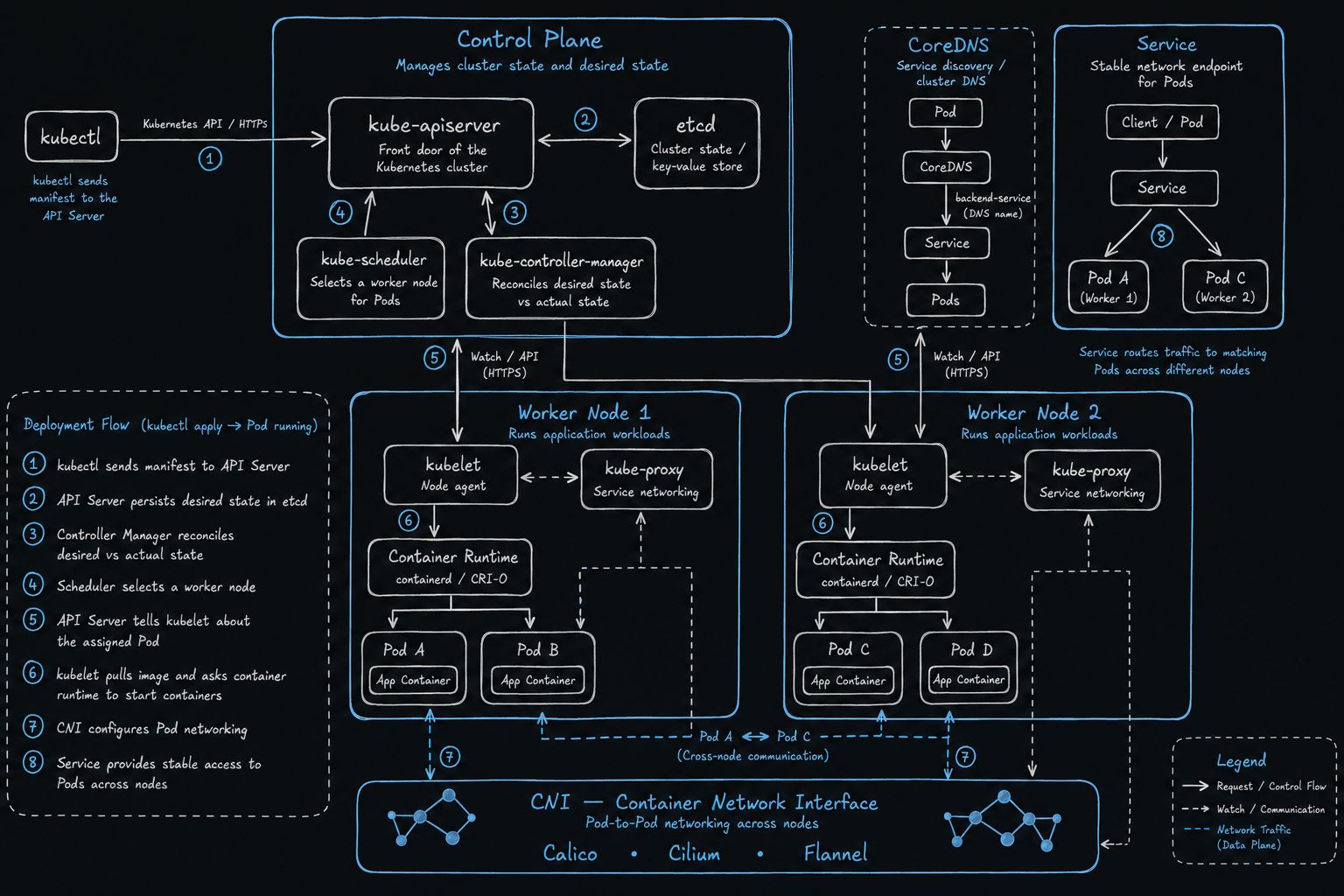
A cluster has two major parts:
- Control plane holds all configuration. In simple terms, it decides what should happen.
- Worker nodes run the actual applications.
Read the diagram from the control plane outward. kubectl talks to kube-apiserver. The API server stores cluster state in etcd. kube-controller-manager compares desired state with actual state, and kube-scheduler chooses a worker node.
Each worker runs a kubelet, a container runtime (containerd or CRI-O), the application Pods, and kube-proxy. CNI connects Pods across nodes. CoreDNS turns a Service name into an address, and the Service sends traffic to matching Pods on different workers.
Control-plane and node components
| Component | Lives on | Role | Flow |
|---|---|---|---|
| kubectl | Your machine | CLI that sends your commands and manifests to the API server | kubectl → kube-apiserver |
| kube-apiserver | Control plane | Front door of the cluster. Almost every operation goes through it. | kubectl / components → API server → cluster |
| etcd | Control plane | Key-value store that persists cluster state: Pods, Deployments, Services, nodes, ConfigMaps, and so on | API server → etcd |
| kube-controller-manager | Control plane | Continuously checks that actual state = desired state and fixes differences | Desired 3 Pods vs actual 2 → creates the missing Pod |
| kube-scheduler | Control plane | Decides which worker node runs a newly created Pod | New Pod → Scheduler → Worker Node |
| kubelet | Each worker node | Node agent that receives an assigned Pod and makes sure its containers run | API server → kubelet → container runtime |
| Container runtime | Each worker node | Pulls images and starts containers (containerd or CRI-O) |
kubelet → runtime → container |
| Pod | Worker node | Smallest deployable unit; contains one or more application containers | Pod → application container |
| kube-proxy | Each worker node | Implements Service networking on that node | Service → kube-proxy rules → Pod |
Networking and service discovery
| Component | What it does |
|---|---|
| CNI (Container Network Interface) | Configures Pod networking so Pods can talk across nodes. The diagram names Calico, Cilium, and Flannel. |
| CoreDNS | Cluster DNS. A Pod looks up a Service by name, and CoreDNS returns the Service. |
| Service | A stable network endpoint in front of matching Pods, even when those Pods run on different workers: Client / Pod → Service → Pod A, Pod C. |
Deployment flow
The numbered path on the diagram is what happens from kubectl apply until the Pods are reachable:
| Step | What happens |
|---|---|
| 1. kubectl sends the manifest | The manifest goes to the API server over the Kubernetes API. |
| 2. Desired state is stored | The API server writes that desired state into etcd. Nothing is running yet. |
| 3. Controller manager reconciles | It compares desired state with actual state and creates whatever is missing. |
| 4. Scheduler selects a node | It chooses a worker that can run the Pod. |
| 5. The API server tells the kubelet | The kubelet on the selected node learns that the Pod is assigned to it. |
| 6. The runtime starts the containers | The kubelet pulls the image and asks the container runtime to start the containers. |
| 7. CNI configures networking | Pods receive network addresses and can communicate across nodes, such as Pod A on worker 1 with Pod C on worker 2. |
| 8. A Service provides stable access | The Service routes traffic to the matching Pods. CoreDNS lets other Pods find that Service by name instead of by Pod IP. |
Key takeaway You declare the desired state. The API server records it, the controller manager and scheduler decide what must run and where, and the kubelet on a worker starts the containers. CNI connects them, and a Service plus CoreDNS keeps them reachable.