Pods, ReplicaSets, and Deployments
Run a Pod, keep a count with a ReplicaSet, and manage updates, scaling, and rollbacks with a Deployment.
Pods
A Pod is the smallest unit Kubernetes can run: a thin wrapper around a container that gives it an address on the cluster network and lets Kubernetes track and manage it. Usually one Pod equals one container.
Why not just a container? Kubernetes needs one consistent unit it can schedule onto a node, give a network address, and restart and monitor. A Pod is that unit. It also supports the less common case of two tightly coupled containers sharing a network address and storage, covered in specialized workloads.
| Command | Purpose |
|---|---|
kubectl run <name> --image=<image> |
Create a Pod from an image |
kubectl get pods |
List Pods with READY and STATUS |
kubectl describe pod <name> |
Full report: node, IP, image, Events |
kubectl logs <pod> |
Print what the container wrote to its output |
kubectl logs -f <pod> |
Follow the log live |
kubectl exec <pod> -- <command> |
Run one command inside the Pod |
kubectl exec -it <pod> -- sh |
Open an interactive shell in the Pod |
kubectl delete pod <name> |
Remove a Pod |
Pod phases
| Phase | Meaning |
|---|---|
| Pending | Accepted by the cluster but not running yet: waiting to be scheduled or for the image to download. ContainerCreating is part of this phase. |
| Running | Assigned to a node and the container has started. A long-running server like nginx stays here. |
| Succeeded | Container ran to completion and exited cleanly (exit code 0). This is the normal end for one-off tasks. |
| Failed | Container stopped with an error or a non-zero exit code. |
| Unknown | Kubernetes lost contact with the node and cannot tell. Rarely seen. |
A Pod moves from Pending to Running once it is scheduled and its container starts. From Running it can become Succeeded (exit code 0), Failed (non-zero exit), or Unknown if the node is unreachable. Pending can also go straight to Failed.
Manifests and YAML
Every Kubernetes manifest uses the same four top-level fields:
apiVersion: v1 # which version of the Kubernetes API this uses
kind: Pod # what kind of object you are describing
metadata: # facts about the object - its name, its labels
  name: web
  labels:
    app: web
spec: # what you actually want - the desired state
  containers:
    - name: web
image: nginx:alpine| Field | Meaning |
|---|---|
apiVersion |
Which part of the API the manifest uses. A Pod is in the core group, version v1. Check the docs or any live object rather than memorizing every version. |
kind |
The type of object (Pod, later Deployment, Service, and so on). |
metadata |
Information about the object: its name (how users and Kubernetes identify it) and labels (key-value tags). |
spec |
The desired state. For a Pod: the containers, each with a name and image (what the old --image flag became). |
Applying manifests, labels, and annotations
| Command | Purpose |
|---|---|
kubectl apply -f <file> |
Create or update objects so the cluster matches the file |
kubectl delete -f <file> |
Remove the objects the file describes (the file stays) |
kubectl get pods -l <key>=<value> |
List only Pods matching a label selector (--selector) |
kubectl label pod <name> <key>=<value> |
Add a label |
kubectl label pod <name> <key>=<value> --overwrite |
Change an existing label’s value |
kubectl label pod <name> <key>- |
Remove a label by key |
kubectl annotate pod <name> <key>=<value> |
Attach non-identifying metadata |
kubectl annotate pod <name> <key>- |
Remove an annotation by key |
ReplicaSets
A ReplicaSet keeps a specified number of identical Pods running. Ask for three and it maintains three, creating replacements when one fails and removing extras.
| Field | Purpose |
|---|---|
replicas |
How many identical Pods you want. |
template |
Blueprint for each Pod: a full Pod definition (metadata plus spec) nested inside. Every Pod follows it, so they are identical. |
selector |
How the ReplicaSet recognizes its Pods: by label (for example, app: web), not by name. It counts matching Pods, compares them with replicas, and corrects any difference. |
apiVersion: apps/v1
kind: ReplicaSet
metadata:
  name: web
spec:
  replicas: 3
  selector:
    matchLabels:
      app: web
  template:
    metadata:
      labels:
        app: web
    spec:
      containers:
        - name: web
          image: nginx:alpine
Deployments
A Deployment manages an application’s desired state. It creates and manages ReplicaSets, which maintain the required number of Pods. A ReplicaSet mainly ensures that N Pods are running; a Deployment also manages changes over time.
| Capability | Meaning |
|---|---|
| Rolling updates | Gradually replace old Pods with new ones |
| Minimal downtime | App stays available during releases |
| Rollback | Return to a previous version if the new one misbehaves, because the earlier ReplicaSet is kept |
| ReplicaSet management | Creates and manages ReplicaSets automatically |
| Version management | Simple image and config updates |
| Desired-state control | Continuously ensures the app matches what you declared |
In short: a ReplicaSet keeps the desired number of Pods running; a Deployment manages their whole lifecycle, including updates and rollbacks.
apiVersion: apps/v1
kind: Deployment
metadata:
  name: web-app
spec:
  replicas: 3
  selector:
    matchLabels:
      app: web-app
  template:
    metadata:
      labels:
        app: web-app
    spec:
      containers:
        - name: web
          image: nginx:alpine
The replicas, selector.matchLabels, and template sections are the same as in a ReplicaSet. The labels in selector and template must match. That is how the Deployment finds its Pods. Apply it with kubectl apply -f.
Deployment, ReplicaSet, and Pods
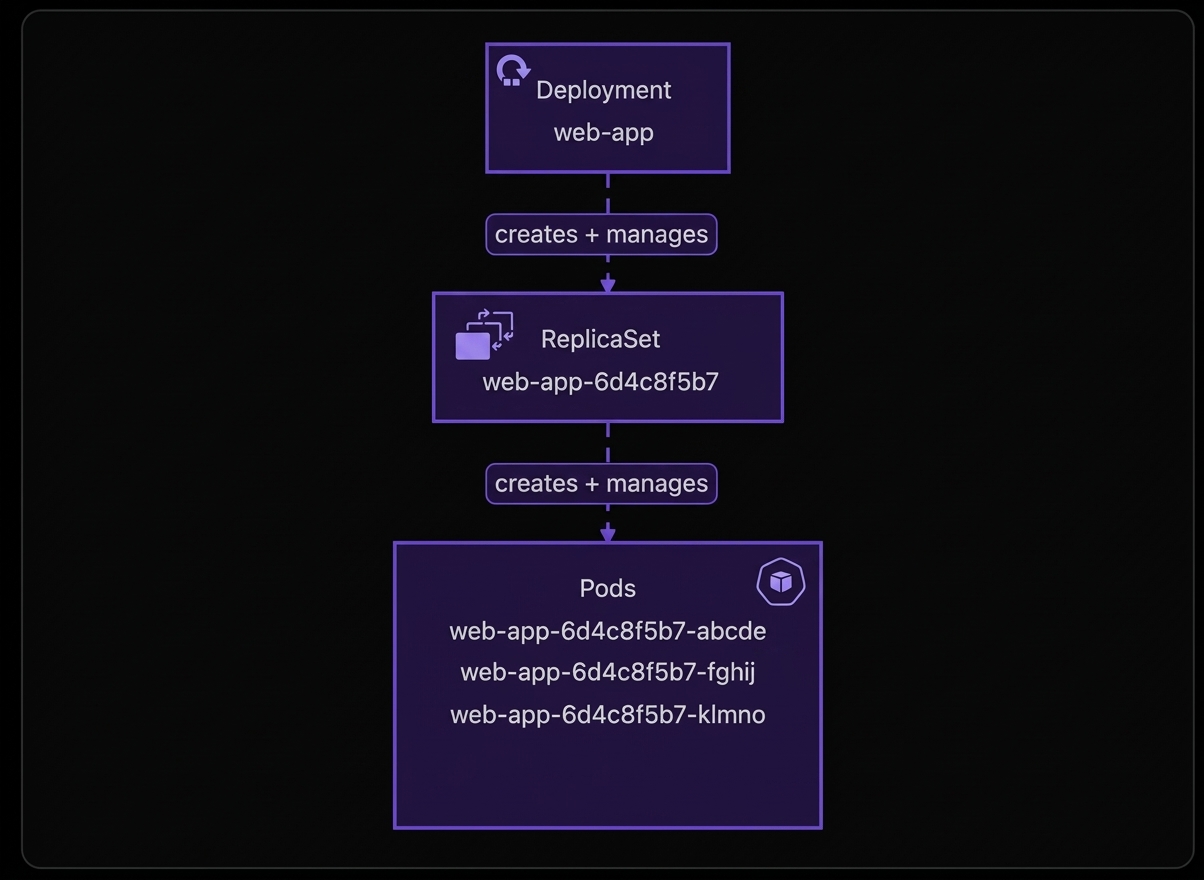
Creating web-app triggers a chain: the Deployment (what you asked for) creates a ReplicaSet (which you never wrote), which creates and maintains the three Pods.
| Command | Purpose |
|---|---|
kubectl create deployment <name> --image=<image> |
Quickly create a Deployment |
kubectl get deploy |
List Deployments |
kubectl get deploy,rs,pods |
List Deployments, ReplicaSets, and Pods together |
kubectl get deploy <name> |
Status line: READY, UP-TO-DATE, AVAILABLE |
kubectl describe deployment <name> |
Full details and recent events |
kubectl delete deployment <name> |
Remove the Deployment and the ReplicaSet and Pods it owns |
NAME      READY   UP-TO-DATE   AVAILABLE   AGE
web-app 3/3 3 3 2m| Column | Meaning |
|---|---|
| READY | Ready Pods out of desired (3/3). Equal means every requested copy is running and passing checks. It is briefly 2/3 during an update or restart. |
| UP-TO-DATE | Pods running the Deployment’s latest version. This matters when you update the image. |
| AVAILABLE | Pods currently available to serve requests; equals desired when healthy. |
| AGE | How long the Deployment has existed. |
Self-healing through the Deployment
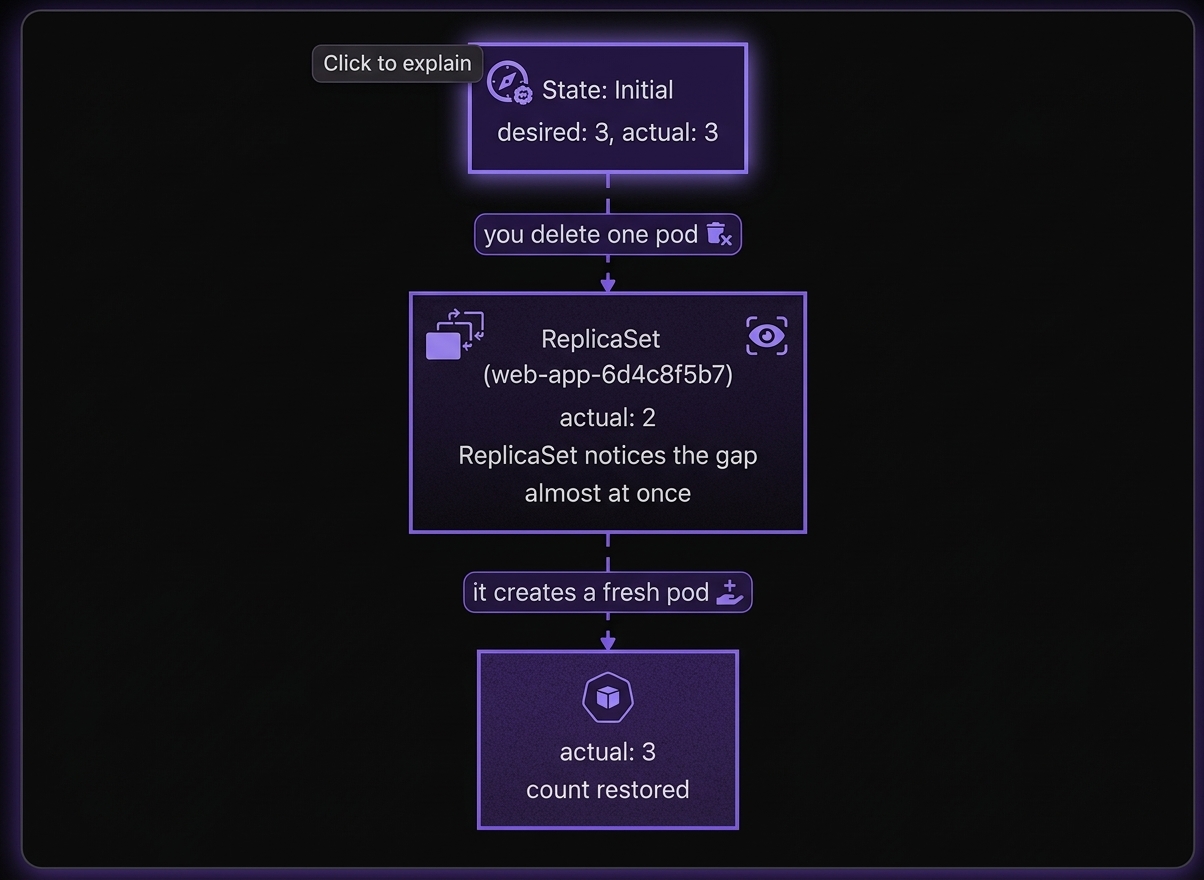
The ReplicaSet watches continuously, not once. If a Pod disappears because you delete it, it crashes, or its node fails, the count returns to the desired number within seconds. The replacement is a brand-new Pod with a different name, not the old one restarted.
The Deployment does not recreate the Pod. The ReplicaSet does. Since you never manage the ReplicaSet directly, think of the Deployment as healing itself. A standalone Pod is fragile; a Pod managed by a Deployment is durable.
Deployment vs ReplicaSet
| Aspect | ReplicaSet | Deployment |
|---|---|---|
| Level | Lower: controls Pods | Higher: controls ReplicaSets |
| Primary job | Keep N Pod copies running and replace crashed Pods | Manage releases: how Pods are created, updated, and rolled back |
| Updates | None. Changing the image leaves existing Pods unchanged until they are deleted manually | Rolling updates without downtime |
| Version history | None | Revision history, so you can roll back |
| Direct use | Rarely | The standard way to run apps |
What an update looks like (nginx:v1 → nginx:v2):
- Update the Deployment manifest to
nginx:v2and runkubectl apply. - The Deployment keeps the existing ReplicaSet (v1).
- It creates a new ReplicaSet (v2).
- Rolling update: scale v2 up by one Pod, scale v1 down by one, and repeat until v2 has all the Pods and v1 has zero.
- The empty v1 ReplicaSet is kept as a backup.
kubectl rollout undo deployment/<name>scales v1 back up and v2 to zero.
Takeaway The ReplicaSet is the engine guaranteeing quantity. The Deployment is the steering wheel controlling versioning, updates, and rollbacks.
Scaling
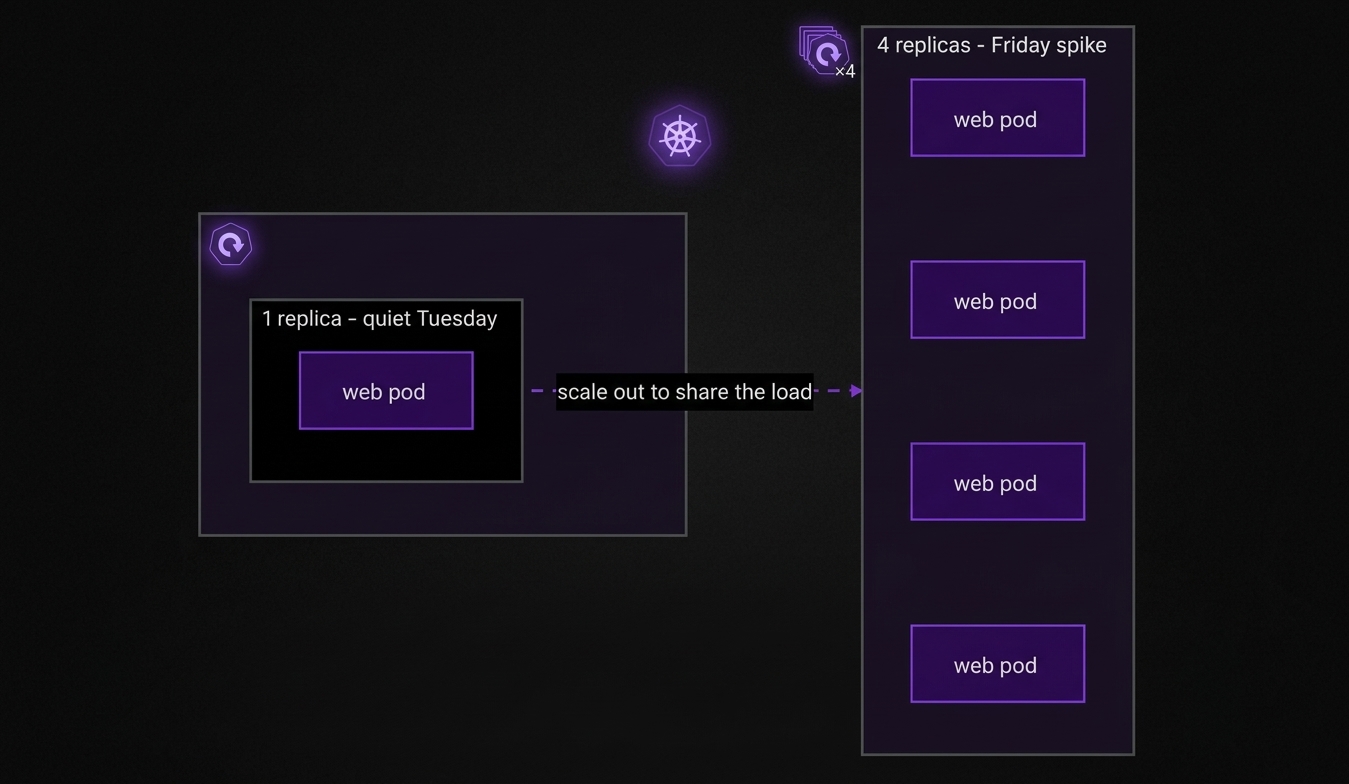
| Command | Purpose |
|---|---|
kubectl scale deployment <name> --replicas=<n> |
Run exactly n replica Pods |
kubectl get pods -w |
List Pods and keep watching changes until Ctrl+C |
| Aspect | Imperative (kubectl scale) |
Declarative (edit YAML, then kubectl apply) |
|---|---|---|
| Effect | Immediate change to the live cluster | Updates the manifest, then applies it |
| Best for | Emergencies and traffic spikes | Permanent, reviewable scaling |
| Trade-off | Fast but temporary. The YAML is unchanged, so state can drift | Durable and documented. The manifest in Git is the source of truth |
Recommended workflow: first firefight with kubectl scale to add Pods now. Then document the change by updating replicas in the YAML and running kubectl apply -f.
Rule: the manifest is always the source of truth. If you only run
kubectl scale, the change can be silently overwritten the next time someone runskubectl apply.
Rolling updates
A rolling update replaces old Pods with new ones in small, overlapping batches so the app stays available. Kubernetes makes sure new Pods are healthy before removing old ones.
- Trigger by changing the container image in the Deployment.
- Phase in a new Pod with the updated version alongside the old ones.
- Phase out one old Pod once the new Pod is ready.
- Repeat until every Pod runs the new version.
Key properties: zero downtime (target capacity is maintained), side-by-side execution of old and new for a short time, and fully automated replacement. You declare the image; the Deployment controller handles batching and health checks.
| Command | Purpose |
|---|---|
kubectl set image deployment/NAME CONTAINER=IMAGE |
Change the image in place, which triggers a rolling update |
kubectl rollout status deployment/NAME |
Follow the update until it finishes |
kubectl rollout history deployment/NAME |
List numbered revisions |
kubectl rollout history deployment/NAME --revision=N |
Details of one revision |
kubectl rollout undo deployment/NAME |
Roll back to the previous revision |
kubectl rollout undo deployment/NAME --to-revision=N |
Roll back to a specific revision |
Controlling the pace
Set these under spec.strategy.rollingUpdate:
| Parameter | Role | Example (3 replicas) |
|---|---|---|
maxUnavailable, the floor |
Maximum Pods that may be unavailable during the rollout | maxUnavailable: 1 means never fewer than 3 − 1 = 2 serving Pods |
maxSurge, the ceiling |
Maximum extra Pods above the desired count | maxSurge: 1 means never more than 3 + 1 = 4 Pods |
Both default to 25%. Lower values are safer and slower. Higher values are faster, at the cost of temporary extra resources or reduced capacity.
With 3 replicas and maxSurge: 1, and with new Pods becoming ready immediately, the counts move like this:
| Step | v1 (old) Pods | v2 (new) Pods | Total |
|---|---|---|---|
| start | 3 | 0 | 3 |
| 1 | 3 | 1 | 4 (ceiling) |
| 2 | 2 | 1 | 3 |
| 3 | 2 | 2 | 4 |
| 4 | 1 | 2 | 3 |
| 5 | 1 | 3 | 4 |
| done | 0 | 3 | 3 |